Quick Start
This guide walks through the five core workflows of Synapsys — from a single transfer function to a full distributed closed-loop simulation. Each section builds on the previous one.
Install Synapsys before starting: pip install synapsys or uv add synapsys
1. Analysing a Continuous-Time System
A transfer function describes how a linear time-invariant (LTI) system transforms an input into an output in the Laplace domain:
Key parameters:
- — natural frequency: how fast the system oscillates (rad/s)
- — damping ratio: how quickly oscillations decay (
0 < ζ < 1→ underdamped)
The step response — output when the input jumps from 0 to 1 at — reveals the dynamic behaviour: overshoot, rise time, and settling time.
from synapsys.api import tf, step
import matplotlib.pyplot as plt

# G(s) = ωn² / (s² + 2ζωn·s + ωn²)
wn, zeta = 10.0, 0.5
G = tf([wn**2], [1, 2*zeta*wn, wn**2])

# Inspect the system
print(f"Poles:      {G.poles()}")      # complex conjugate pair
print(f"DC gain:    {G.evaluate(0).real:.4f}")   # G(0) = 1.0
print(f"Stable:     {G.is_stable()}")  # True — all poles in left half-plane

# Compute and plot step response
t, y = step(G)

plt.figure(figsize=(9, 4))
plt.plot(t, y, label="y(t)")
plt.axhline(1.0, color="gray", ls="--", alpha=0.6, label="setpoint")
plt.xlabel("Time (s)"); plt.ylabel("y(t)")
plt.title("Step Response"); plt.legend(); plt.grid(True)
plt.show()
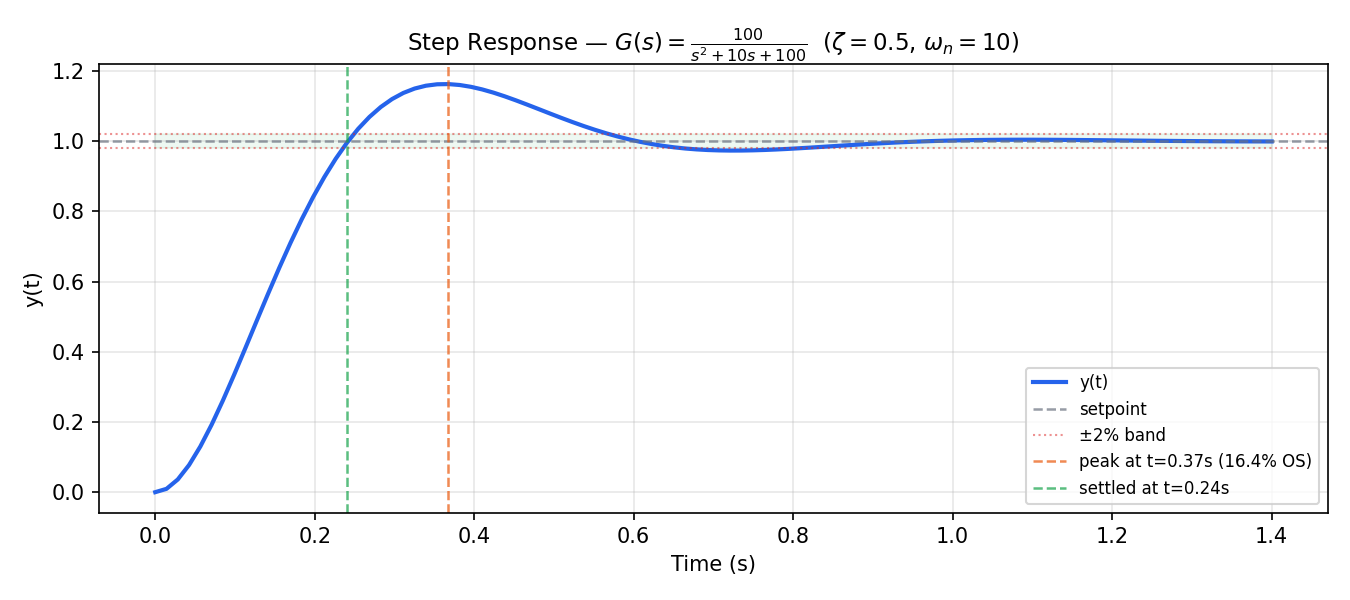
The system overshoots by ~16.4% and settles (within ±2% of the setpoint) at ~0.24 s. Both are directly predictable from :
2. Closed-Loop with Unity Negative Feedback
An open-loop system amplifies the input but cannot reject disturbances or correct steady-state error. Closing the loop with negative feedback trades some gain for stability and disturbance rejection.
For a plant with unity negative feedback, the closed-loop transfer function is:
from synapsys.api import tf, feedback, step

G = tf([10], [1, 1])       # G(s) = 10/(s+1)  — DC gain = 10
T = feedback(G)            # T(s) = 10/(s+11) — DC gain = 10/11 ≈ 0.909

print(f"Open-loop  DC gain: {G.evaluate(0).real:.4f}")   # 10.0
print(f"Closed-loop DC gain: {T.evaluate(0).real:.4f}")  # 0.9091

t, y = step(T)
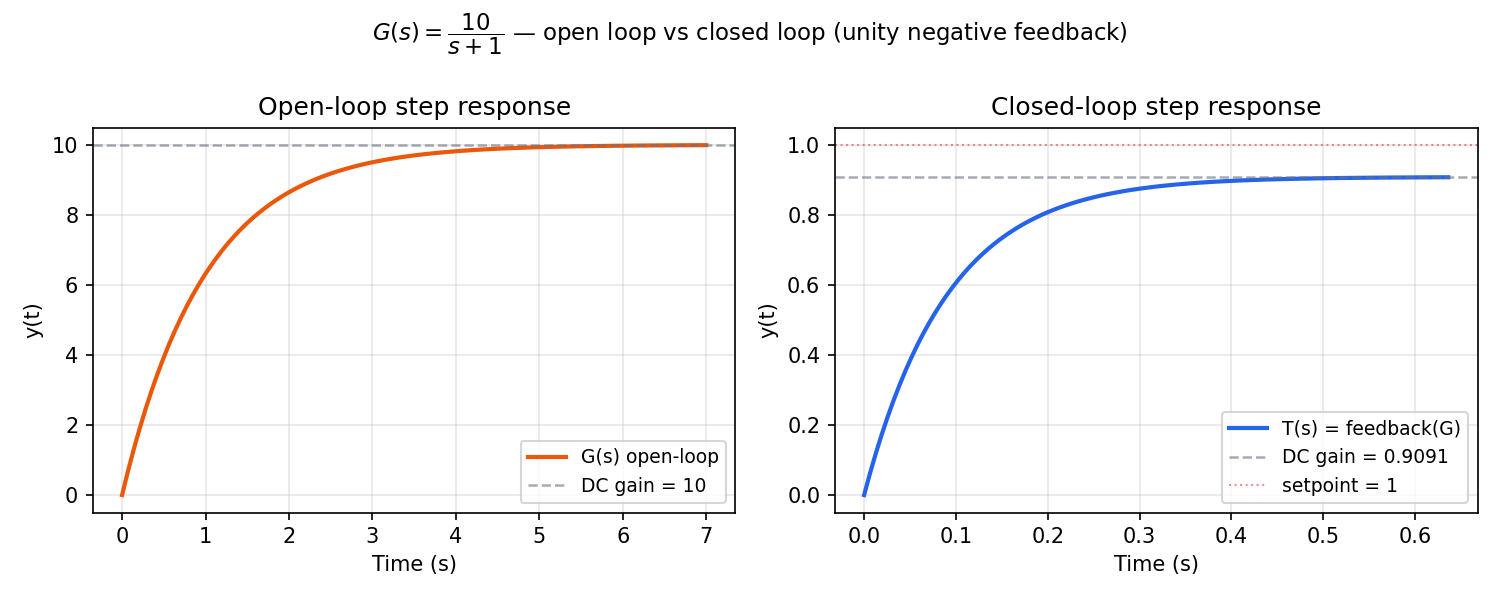
Open-loop (left): the output rises to 10× the input and settles slowly — no reference tracking, just amplification.
Closed-loop (right): feedback(G) reduces the DC gain to . This residual error () is the steady-state error inherent to a proportional-only loop. Adding an integrator (see section 4) eliminates it.
feedback() APIfeedback(G) computes G/(1+G).
feedback(G, C) computes the loop G·C/(1+G·C) with controller C in the forward path.
3. Discretisation
Real controllers run on digital hardware at a fixed sampling rate. c2d converts a continuous model to a discrete one using Zero-Order Hold (ZOH) — assuming the control input is constant between samples:
Choosing the right sampling period is critical:
- Too slow ( large): aliasing, poor approximation of the continuous dynamics
- Too fast ( small): unnecessary computation, numerical issues
- Rule of thumb: — sample at least 10× the system bandwidth
from synapsys.api import tf, c2d, step

G = tf([1], [1, 2, 1])        # G(s) = 1/(s+1)² — continuous

Gd_fast = c2d(G, dt=0.05)     # 20 Hz — well above bandwidth
Gd_slow = c2d(G, dt=0.5)      # 2 Hz — too coarse

print(f"Discrete (fast): {Gd_fast.is_discrete}")  # True
print(f"Stable:          {Gd_fast.is_stable()}")   # True

# Step response — 200 samples
t_fast, y_fast = step(Gd_fast, n=200)
t_slow, y_slow = step(Gd_slow, n=20)
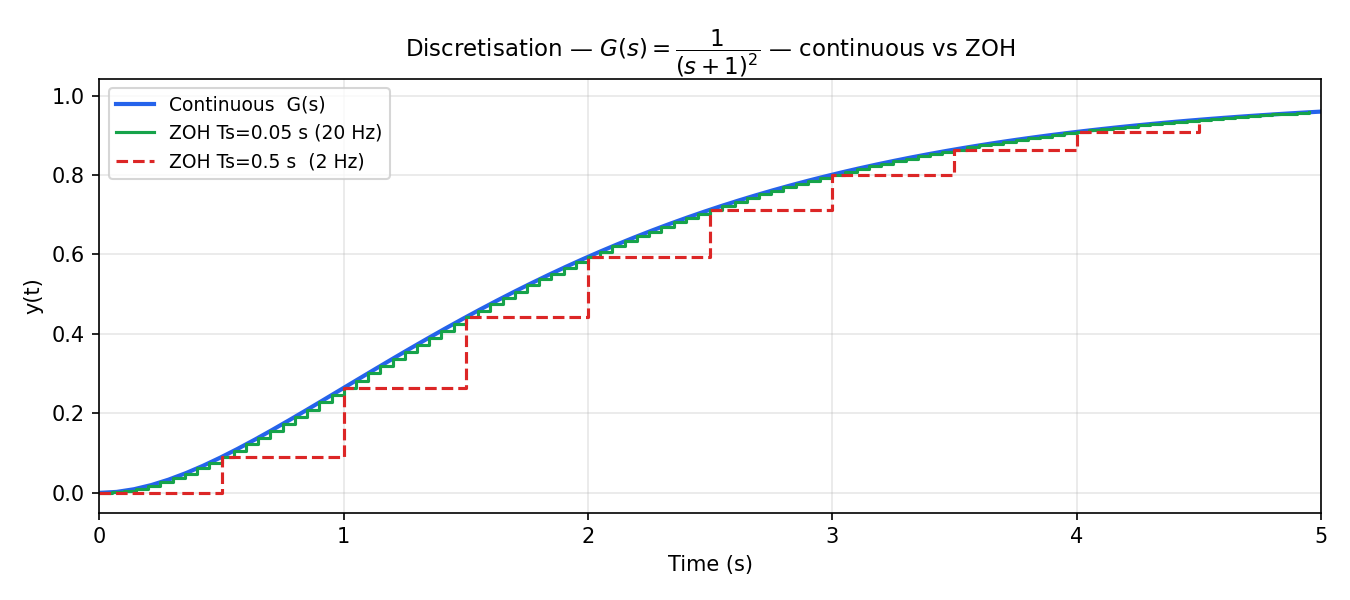
At 20 Hz (green) the discrete response is virtually identical to the continuous one. At 2 Hz (red dashed) the ZOH staircase is clearly visible — the output holds each sample until the next tick.
4. PID Control
A PID controller computes the control action from three terms:
where is the tracking error.
| Term | Effect | Tuning |
|---|---|---|
| (proportional) | Speed of response | Higher → faster, but more overshoot |
| (integral) | Eliminates steady-state error | Higher → faster correction, but more overshoot/oscillation |
| (derivative) | Damps oscillations | Higher → smoother, but sensitive to noise |
Synapsys provides a discrete PID with anti-windup saturation — the integrator is clamped to [u_min, u_max] to prevent integrator windup when the actuator saturates.
from synapsys.api import tf, c2d
from synapsys.algorithms import PID
import numpy as np

DT = 0.02
plant_d = c2d(tf([25], [1, 5, 25]), dt=DT)   # G(s) = 25/(s²+5s+25)
pid     = PID(Kp=3.0, Ki=1.5, Kd=0.0, dt=DT, u_min=-10.0, u_max=10.0)

SETPOINT = 1.0
x = np.zeros(plant_d.n_states)

for _ in range(400):
    x, y_arr = plant_d.evolve(x, np.array([u]))   # advance plant one step
    y = float(y_arr[0])
    u = pid.compute(setpoint=SETPOINT, measurement=y)
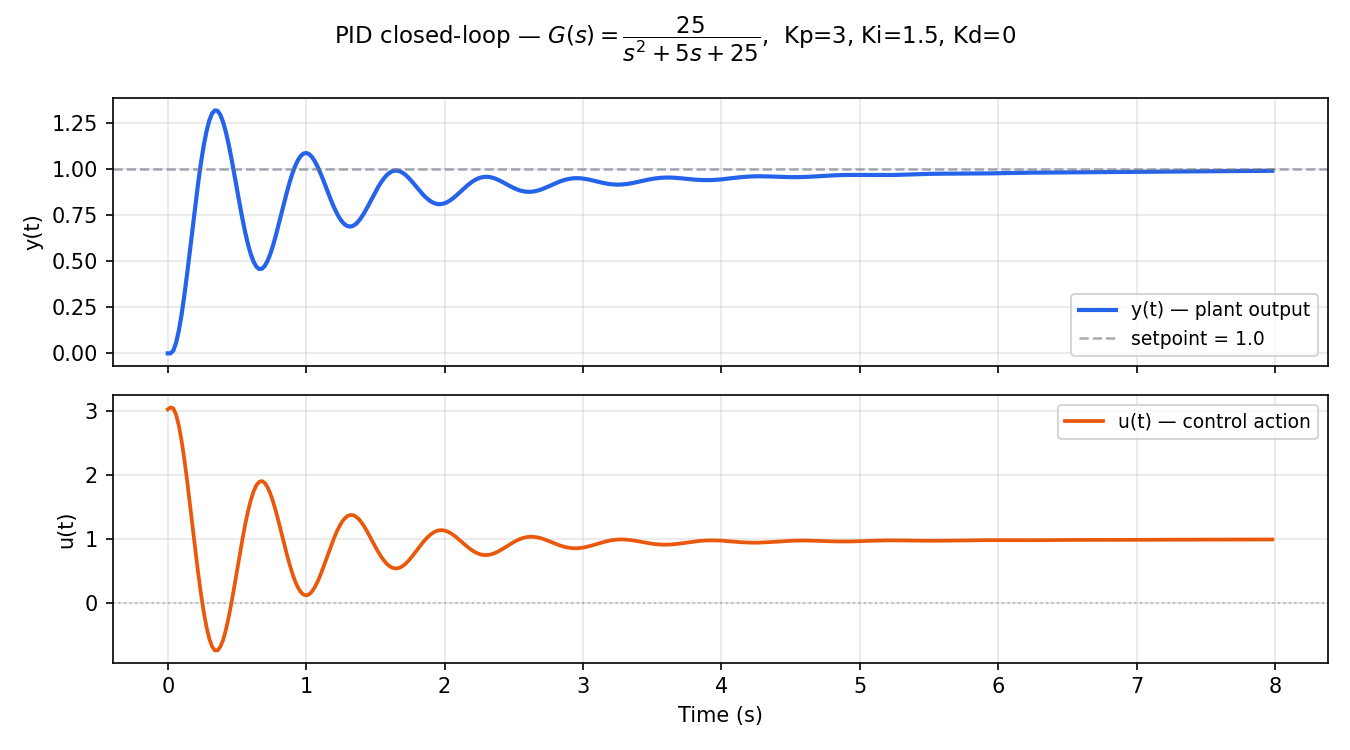
The integral term eliminates the steady-state error seen in section 2 — y(t) converges exactly to the setpoint. The control signal u(t) starts large (high initial error) and decays to a small value that compensates for the plant's finite DC gain.
For a second-order underdamped plant, start with and . Add only if overshoot is too large.
5. Distributed Simulation (Same Machine)
Synapsys can split the plant and controller into separate processes communicating via zero-copy shared memory — mimicking a real embedded system where the plant (PLC/sensor) and controller (computer) run independently.
Run in two separate terminals:
# Terminal 1 — start the plant first
python examples/distributed/01_shared_memory/plant.py

# Terminal 2 — then the controller
python examples/distributed/01_shared_memory/controller.py
The plant exposes its state via shared memory (zero-copy, latency < 1 µs). The controller reads y, computes u with PID, and writes it back — no network sockets involved.
6. Distributed Simulation (Different Machines)
For cross-machine simulation, use ZeroMQ as the transport layer. The plant publishes y over TCP and subscribes to u; the controller does the reverse.
Plant (Machine A):
import numpy as np
from synapsys.api import ss, c2d
from synapsys.agents import PlantAgent, SyncEngine, SyncMode
from synapsys.broker import MessageBroker, Topic, ZMQBrokerBackend

DT = 0.01
plant_d = c2d(ss([[-1]], [[1]], [[1]], [[0]]), dt=DT)

topic_y = Topic("plant/y", shape=(1,))
topic_u = Topic("plant/u", shape=(1,))

broker = MessageBroker()
broker.declare_topic(topic_y)
broker.declare_topic(topic_u)
# PUB y on :5555 — controller subscribes there
# SUB u on :5556 — controller publishes there
broker.add_backend(ZMQBrokerBackend("tcp://0.0.0.0:5555", [topic_y], mode="pub"))
broker.add_backend(ZMQBrokerBackend("tcp://0.0.0.0:5556", [topic_u], mode="sub"))
broker.publish("plant/y", np.zeros(1))
broker.publish("plant/u", np.zeros(1))

agent = PlantAgent(
    "plant", plant_d, None, SyncEngine(SyncMode.WALL_CLOCK, dt=DT),
    channel_y="plant/y", channel_u="plant/u", broker=broker,
)
agent.start(blocking=True)
Controller (Machine B — set PLANT_HOST to Machine A's IP):
import os, numpy as np
from synapsys.algorithms import PID
from synapsys.agents import ControllerAgent, SyncEngine, SyncMode
from synapsys.broker import MessageBroker, Topic, ZMQBrokerBackend

DT = 0.01
PLANT_HOST = os.environ.get("PLANT_HOST", "localhost")

pid = PID(Kp=3.0, Ki=0.5, dt=DT)

topic_y = Topic("plant/y", shape=(1,))
topic_u = Topic("plant/u", shape=(1,))

broker = MessageBroker()
broker.declare_topic(topic_y)
broker.declare_topic(topic_u)
# SUB y from plant :5555
# PUB u to :5556 — plant subscribes there
broker.add_backend(ZMQBrokerBackend(f"tcp://{PLANT_HOST}:5555", [topic_y], mode="sub"))
broker.add_backend(ZMQBrokerBackend("tcp://0.0.0.0:5556", [topic_u], mode="pub"))
broker.publish("plant/u", np.zeros(1))

agent = ControllerAgent(
    "ctrl",
    lambda y: np.array([pid.compute(5.0, y[0])]),
    None, SyncEngine(SyncMode.WALL_CLOCK, dt=DT),
    channel_y="plant/y", channel_u="plant/u", broker=broker,
)
agent.start(blocking=True)
# Machine A — plant
python examples/distributed/02_zmq/plant_zmq.py

# Machine B — controller (set PLANT_HOST to Machine A's IP)
PLANT_HOST=192.168.1.10 python examples/distributed/02_zmq/controller_zmq.py
Both processes can run on the same machine for local testing — just open two terminals.
Next steps
- Examples → — runnable scripts for every pattern (SIL, Digital Twin, Real-Time Oscilloscope, AI controller)
- User Guide → — deep dive into LTI models, PID, LQR, agents and transport
- API Reference → — complete class and function reference