Quadcopter MIMO — Neural-LQR Controller with Real-Time 3D Animation
Files: examples/advanced/06_quadcopter_mimo/
What this example shows
A complete real-time simulation of a 12-state quadcopter controlled by a physics-informed Neural-LQR — and visualised simultaneously in a 3D PyVista scene and a live matplotlib telemetry window. Before the simulation starts, a tkinter configuration GUI lets you choose the reference trajectory, tune its parameters, and set the simulation duration.
| Concept | Detail |
|---|---|
| MIMO LTI modelling | 12-state linearised hover model built with synapsys.api.ss() |
| MIMO LQR | synapsys.algorithms.lqr() on a 12-state / 4-input plant |
| Residual Neural-LQR | δu = −K·e + MLP(e) — residual zeroed at init → starts at optimal LQR |
| Heading-aligned yaw | Drone rotates to face direction of travel — |
| Config GUI | tkinter dialog: simulation time, altitude, reference trajectory & its parameters |
| PyVista 3D | Real-time drone pose animation + trajectory trail at 50 Hz |
| matplotlib telemetry | Position tracking, Euler angles, control inputs — live at 10 Hz |
Physical model — linearised hover
A quadcopter has highly non-linear dynamics, but in the neighbourhood of hover (zero velocity, level attitude) a first-order Taylor expansion yields a useful linear time-invariant (LTI) model valid for small perturbations (|φ|, |θ| ≤ 15°).
State and input vectors
where are roll, pitch, yaw; are body angular rates; and represents deviations from hover equilibrium (hovering at ).
Linearised A and B matrices
The state equation at hover is:
The key gravity-coupling terms are (forward acceleration from pitch ) and (lateral acceleration from roll ):
ẍ = +g·θ     (pitch forward → accelerate in x)
ÿ = −g·φ     (roll right → accelerate in −y)
The input matrix maps each control channel to its dynamical effect:
Physical parameters (500 mm racing quad):
| Symbol | Value | Meaning |
|---|---|---|
| 0.500 kg | Total mass | |
| 4.856 × 10⁻³ kg·m² | Roll / pitch inertia | |
| 8.801 × 10⁻³ kg·m² | Yaw inertia | |
| 0.175 m | Centre-to-motor arm |
The continuous-time model is built with synapsys.api.ss() and discretised at 100 Hz with synapsys.api.c2d() using the zero-order-hold (ZOH) method:
from synapsys.api import ss, c2d

A, B, C, D = build_matrices()   # from quadcopter_dynamics.py
sys_c = ss(A, B, C, D)          # continuous-time LTI
sys_d = c2d(sys_c, dt=0.01)     # ZOH discretisation at 100 Hz
LQR design
The Linear Quadratic Regulator minimises the infinite-horizon cost:
where is the tracking error. The optimal gain matrix is found by solving the Algebraic Riccati Equation (ARE):
Weight matrices used in this example:
Q = diag([20, 20, 30,    # x, y, z       — position errors
           3,  3,  8,    # φ, θ, ψ       — attitude (yaw weighted more)
           2,  2,  4,    # ẋ, ẏ, ż       — linear velocity
          0.5, 0.5, 1])  # p, q, r       — angular rates

R = diag([0.5, 3.0, 3.0, 5.0])   # δF, τφ, τθ, τψ
from synapsys.algorithms import lqr

K, P = lqr(A, B, Q, R)
# K.shape == (4, 12)
# All closed-loop eigenvalues have Re < 0  ✓
The resulting yields a closed-loop system with all eigenvalues in the left half-plane (Re < 0), confirming asymptotic stability.
Neural-LQR controller
Residual architecture
The controller extends LQR with a learnable residual term:
The MLP has architecture 12 → 64 → 32 → 4 with Tanh activations. At initialisation the output layer weights and biases are zeroed, so the network starts as pure LQR and the residual can be trained later via RL or imitation learning without changing any API.
class NeuralLQR(nn.Module):
    def __init__(self, K_np):
        super().__init__()
        self.register_buffer("K", torch.tensor(K_np, dtype=torch.float32))
        self.residual = nn.Sequential(
            nn.Linear(12, 64), nn.Tanh(),
            nn.Linear(64, 32), nn.Tanh(),
            nn.Linear(32,  4),            # ← zeroed at init
        )
        with torch.no_grad():
            nn.init.zeros_(self.residual[4].weight)
            nn.init.zeros_(self.residual[4].bias)

    def forward(self, e):
        return -(e @ self.K.T) + self.residual(e)
Why this design?
| Property | Benefit |
|---|---|
| Stability at t = 0 | LQR baseline is provably stable; residual adds nothing until trained |
| Smooth fine-tuning | RL or IL can adjust the residual without destabilising the loop |
| Interpretable fallback | Remove/zero the MLP → revert to known-optimal LQR at any time |
Reference trajectories
Three reference trajectories are available via the config GUI:
Figure-8 — Lemniscate of Bernoulli
Default: m, rad/s.
Circle
Default: m, rad/s.
Hover (static)
All three trajectories share the takeoff phase: the drone climbs from the ground to hover altitude during the first seconds before tracking begins.
Heading-aligned yaw control
During trajectory tracking the drone automatically rotates to face the direction it is moving. At each simulation step the desired yaw is computed from the current velocity vector:
This reference is injected directly into x_ref[5] before the LQR error is computed, so the existing gain matrix handles yaw correction with no structural changes.
Two edge cases are handled explicitly:
| Condition | Behaviour |
|---|---|
| Speed m/s (near hover) | Hold current yaw — avoids noisy commands when velocity is unreliable |
| Yaw error crosses | Error wrapped to — prevents wind-up through the discontinuity |
def _yaw_ref_from_velocity(vx, vy, psi_current, min_speed=0.08):
    if np.hypot(vx, vy) < min_speed:
        return psi_current      # hold heading during near-hover
    return np.arctan2(vy, vx)

# Inside the simulation loop:
x_ref[5] = _yaw_ref_from_velocity(x[6], x[7], x[5])
e = x - x_ref
e[5] = _wrap_angle(e[5])        # wrap to [-π, π]
The result is clearly visible in the 3D animation: the drone's nose always points along the trajectory tangent as it sweeps through the figure-8 or circle.
Architecture
All data flows from sim_thread into thread-safe collections.deque buffers protected by a single threading.Lock. The main thread reads snapshots without blocking the simulation.
Config GUI
When the script is launched a tkinter dialog appears before any simulation window opens:
| Section | Controls |
|---|---|
| Simulation Time | Total duration (s), takeoff hover phase (s), hover altitude (m) |
| Reference Trajectory | Radio buttons: Figure-8 / Circle / Hover |
| Figure-8 Parameters | Amplitude slider (0.2–2.0 m), angular speed (0.1–0.8 rad/s) |
| Circle Parameters | Radius slider (0.2–3.0 m), angular speed (0.1–0.8 rad/s) |
Clicking Run Simulation closes the dialog, validates the configuration, and starts the simulation and visualisation windows. Cancel exits without running.
Visualisation
PyVista 3D window (50 Hz)
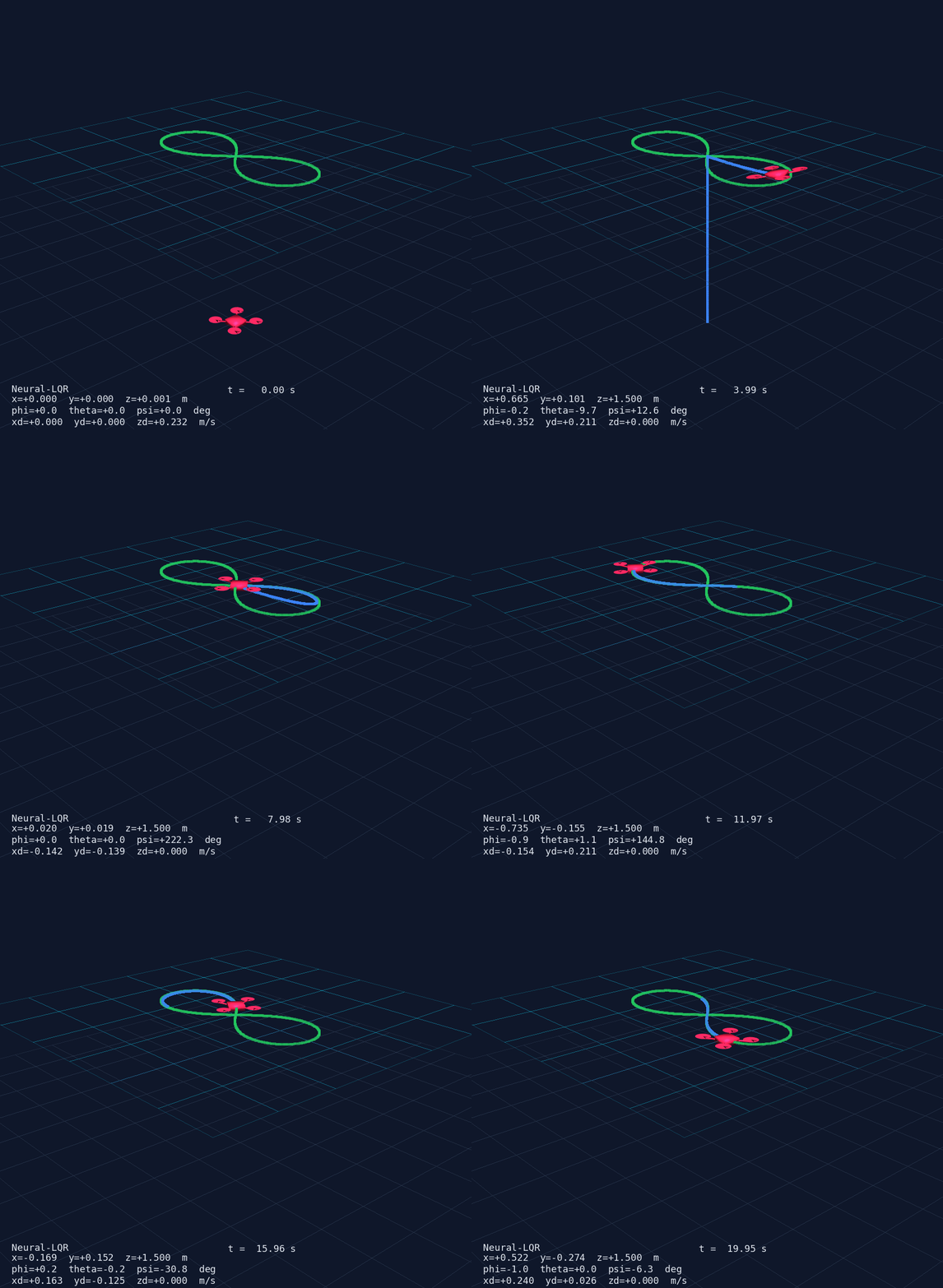
- Drone mesh — X-configuration body (box), 4 arms (cylinders) and 4 rotors (discs); pose updated via
actor.user_matrixfrom the rotation matrix computed withscipy.spatial.transform.Rotation - Trajectory trail — last
TRAIL_LEN = 500positions as apv.PolyDatapolyline, updated in place - Reference curve — static preview of the chosen trajectory rendered at the start
- HUD overlay — live text showing mode, time, position, Euler angles, velocities
matplotlib telemetry window (10 Hz)
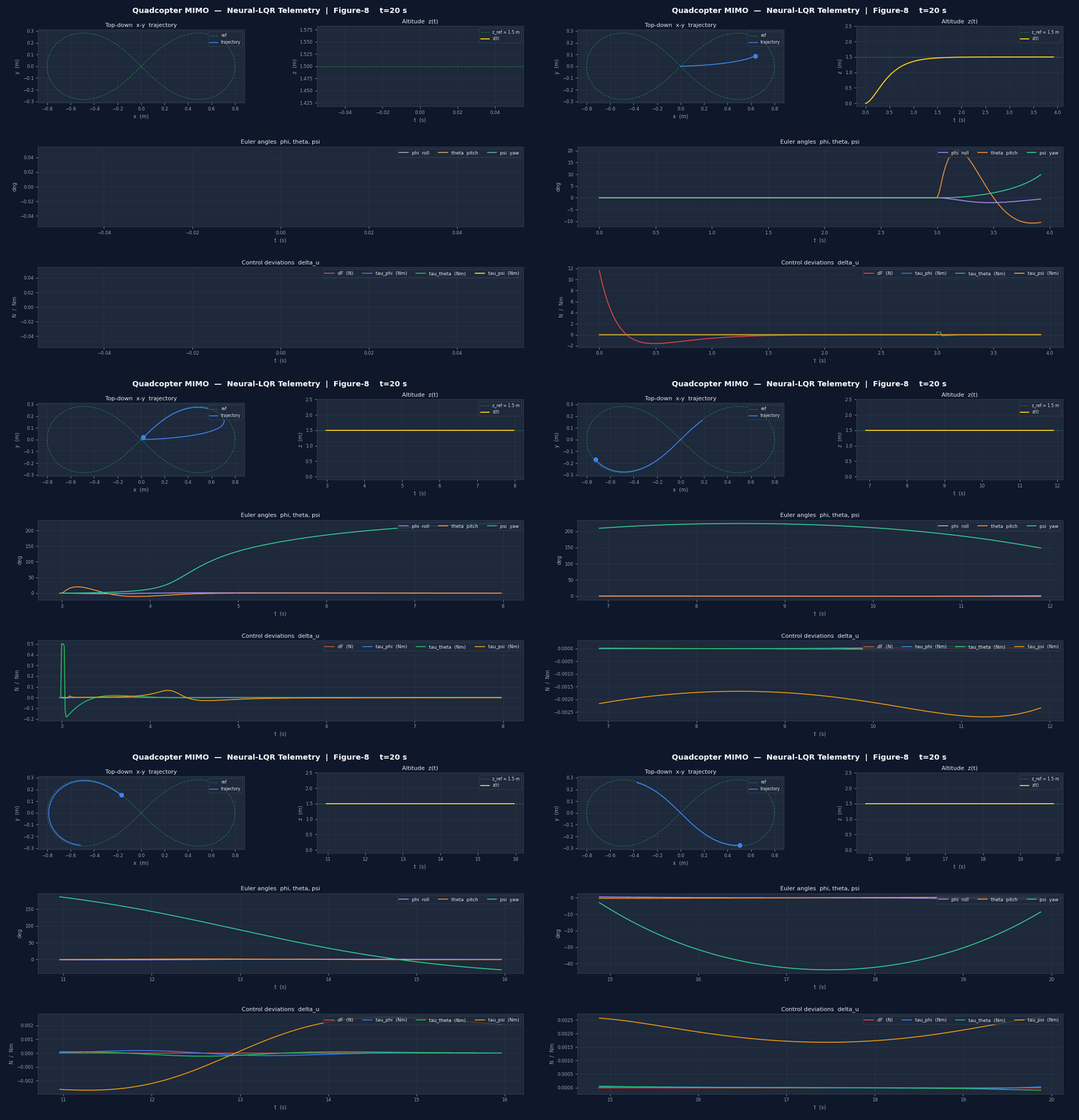
| Panel | Content |
|---|---|
| Top-left | Top-down – trajectory vs. reference curve |
| Top-right | Altitude vs. reference line |
| Middle | Euler angles , , in degrees |
| Bottom | Control deviations , , , |
Both windows run in the same main thread using pv.Plotter(interactive_update=True) and plt.ion(), avoiding cross-thread GUI crashes. The simulation runs in a dedicated daemon thread.
How to run
Install dependencies:
pip install synapsys[viz] torch matplotlib
Run the standalone simulation:
cd examples/advanced/06_quadcopter_mimo
python 06b_neural_lqr_3d.py
- The tkinter config GUI opens — adjust parameters and click Run Simulation
- A matplotlib telemetry window opens with 4 live panels
- A PyVista 3D window opens with the drone animation
- Close either window or press Ctrl+C to stop
Export GIF recordings (no display needed):
# Default: 20 s run, 15 fps 3D GIF + 7 fps telemetry GIF → current dir
python 06b_neural_lqr_3d.py --save

# Custom: 30 s, faster PyVista, slower telemetry, custom output folder
python 06b_neural_lqr_3d.py --save --fps 20 --mpl-fps 8 --out ./results
Saves quadcopter_3d.gif (~1.8 MB) and quadcopter_telemetry.gif (~4 MB) in under 2 minutes. Requires pip install imageio.
Two-process SIL variant (optional):
# Terminal 1 — start the linearised plant on shared memory
python 06a_quadcopter_plant.py

# Terminal 2 — connect an external controller via MessageBroker + SharedMemoryBackend
# (adapt 06b to read from the bus instead of running its own simulation)
The NeuralLQR.residual sub-network (12→64→32→4, Tanh) starts at zero — it does nothing until trained. Replace the zero-initialised weights with one trained via PPO, SAC, or DDPG and the rest of the example stays identical. The synapsys API calls (ss(), c2d(), lqr(), evolve()) do not change.
The current reference only prescribes position. For aggressive manoeuvres, add a kinematically consistent velocity feedforward (, ) to the reference state — this reduces tracking error during the figure-8 phase significantly.
The hover model is valid only for . Aggressive manoeuvres that exceed this envelope will cause divergence. For full-envelope flight, replace the LTI model with a non-linear model (e.g., Euler-Lagrange equations) and use feedback linearisation or NMPC.
File reference
| File | Purpose |
|---|---|
quadcopter_dynamics.py | Physical constants, build_matrices(), figure8_ref(), LQR weights |
06a_quadcopter_plant.py | Two-process SIL plant via PlantAgent + SharedMemoryBackend |
06b_neural_lqr_3d.py | Standalone simulation: config GUI, Neural-LQR, PyVista 3D, matplotlib |
Key synapsys API calls
| Call | What it does |
|---|---|
ss(A, B, C, D) | Builds a continuous-time StateSpace object |
c2d(sys_c, dt) | Discretises to ZOH discrete-time StateSpace |
sys_d.evolve(x, u) | One-step state update: returns |
lqr(A, B, Q, R) | Solves ARE, returns gain matrix and cost matrix |
Source
| File | Description |
|---|---|
examples/advanced/06_quadcopter_mimo/quadcopter_dynamics.py | Physical constants, build_matrices(), reference trajectory generators, LQR weight matrices |
examples/advanced/06_quadcopter_mimo/06a_quadcopter_plant.py | Two-process SIL plant — PlantAgent + SharedMemoryBackend |
examples/advanced/06_quadcopter_mimo/06b_neural_lqr_3d.py | Standalone simulation — tkinter GUI, Neural-LQR, PyVista 3D, matplotlib telemetry, GIF export |