3D Simulators — Usage Guide
This guide shows how to use the three 3D simulators, from the simplest case
(CartPoleView().run()) to customizing physical parameters and initial conditions.
Cart-Pole
Classic control benchmark: a cart on a track with an articulated inverted pendulum. 4-dimensional state, unstable at the vertical equilibrium.
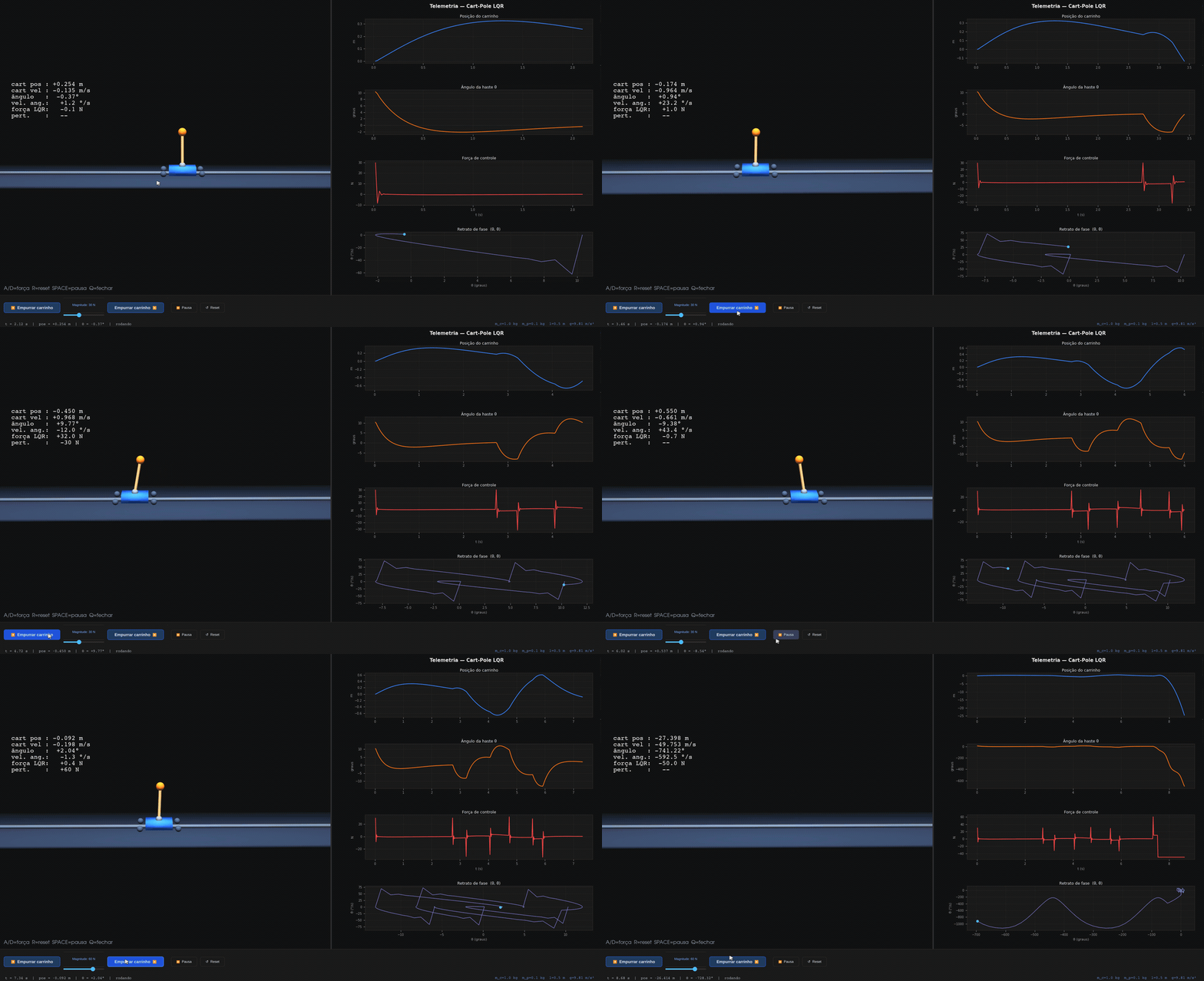
from synapsys.viz import CartPoleView

CartPoleView().run()
Physical parameters (default values):
| Parameter | Default | Description |
|---|---|---|
m_c | 1.0 kg | cart mass |
m_p | 0.1 kg | bob mass |
l | 0.5 m | pole length |
g | 9.81 m/s² | gravity |
State: x = [cart position, velocity, angle θ, angular velocity θ̇]
Default LQR: Q = diag([1, 0.1, 100, 10]), R = 0.01·I
Custom initial state:
import numpy as np
CartPoleView(x0=np.array([0.0, 0.0, 0.30, 0.0])).run()  # initial angle 0.30 rad
The cart changes color to amber at 72% of the track and to red at 92%. When it exceeds 92%, the simulation resets automatically.
Inverted Pendulum
Single-link pendulum on a fixed base. The simplest system for testing
controllers — only 2 states, unstable pole at +√(g/l).
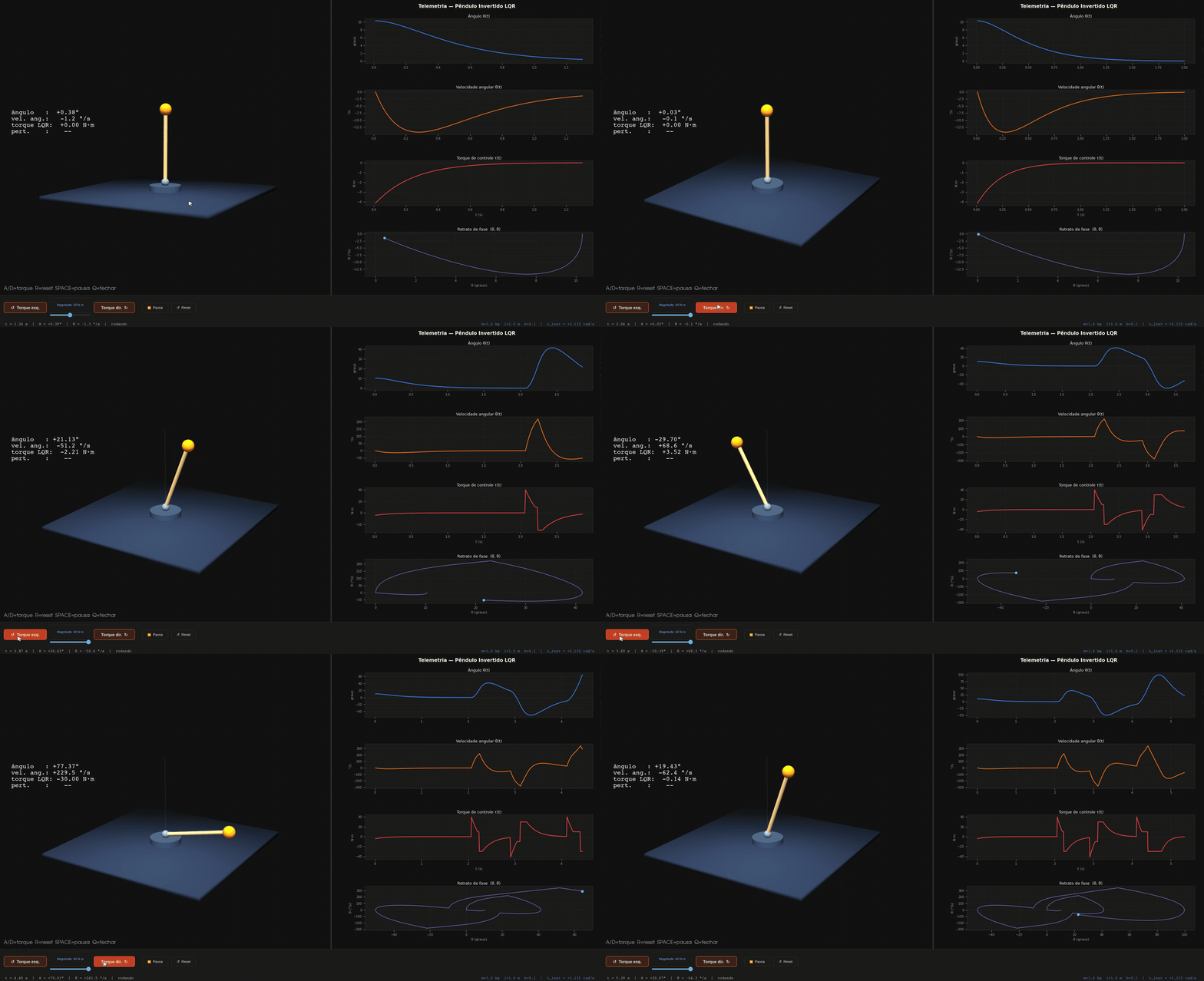
from synapsys.viz import PendulumView

PendulumView().run()
Physical parameters (default values):
| Parameter | Default | Description |
|---|---|---|
m | 1.0 kg | bob mass |
l | 1.0 m | pole length |
g | 9.81 m/s² | gravity |
b | 0.1 | viscous damping coefficient |
State: x = [θ, θ̇]
Default LQR: Q = diag([80, 5]), R = I
Mass-Spring-Damper
1D mass-spring-damper system with setpoint tracking. The MSD has extra controls in the bar: buttons to select 3 reference positions (0 m, +1.5 m, −1.5 m) and keyboard shortcuts 1/2/3.
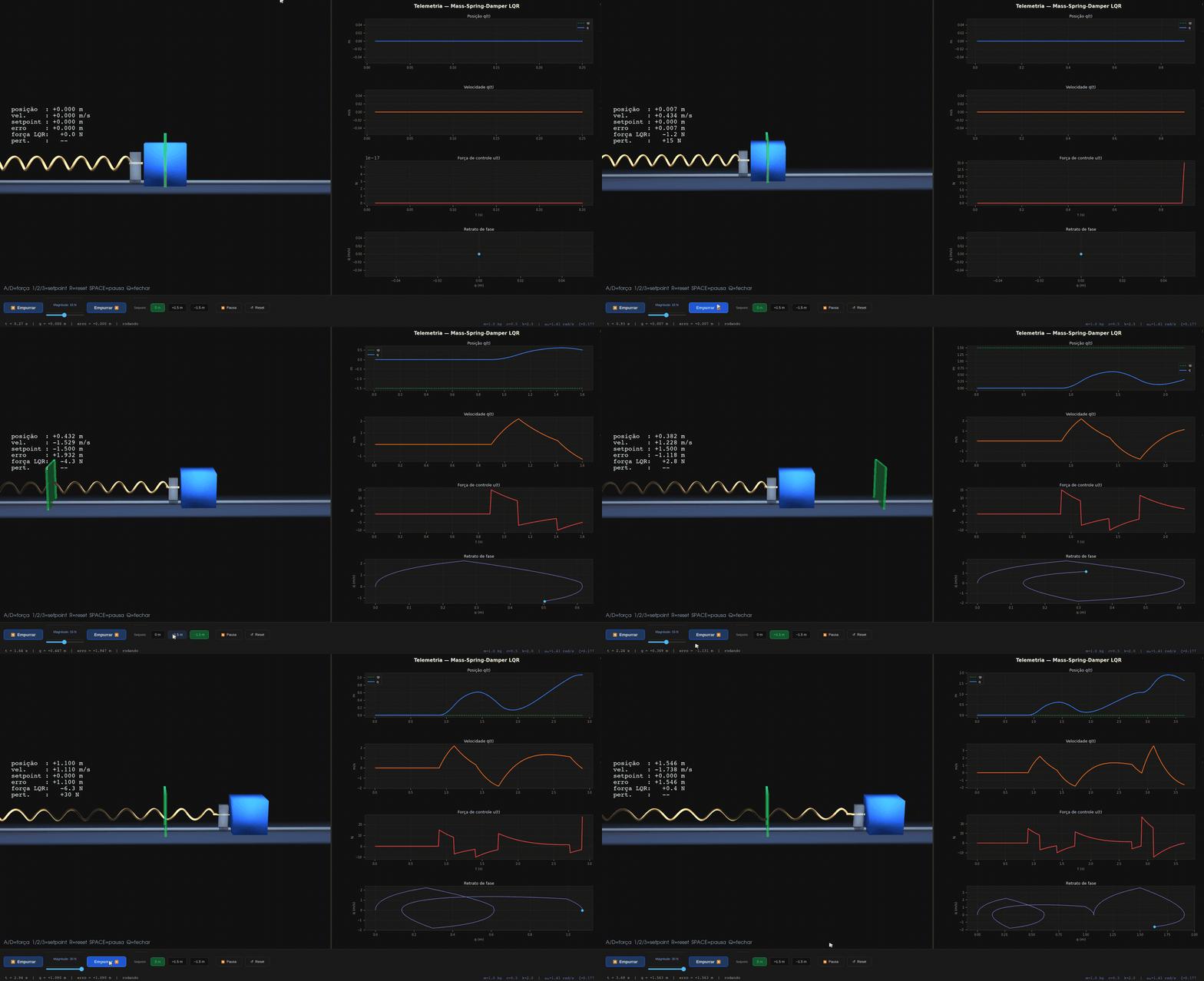
from synapsys.viz import MassSpringDamperView

MassSpringDamperView().run()
Physical parameters (default values):
| Parameter | Default | Description |
|---|---|---|
m | 1.0 kg | mass |
c | 0.5 N·s/m | damping coefficient |
k | 2.0 N/m | spring constant |
State: x = [q, q̇]
LQR control law (with setpoint feed-forward):
u = −K·(x − x_ref) + k·sp
Available setpoints (keyboard):
| Key | Setpoint |
|---|---|
1 | 0.0 m |
2 | +1.5 m |
3 | −1.5 m |
Custom setpoints and initial state:
import numpy as np
MassSpringDamperView(
    setpoints=[("0", 0.0), ("+2m", 2.0), ("-2m", -2.0)],
    x0=np.array([1.0, 0.0]),
).run()
Window anatomy
┌──────────────────────────────────────────────────────────────────────┐
│  Window title                                                        │
├──────────────────────────────┬───────────────────────────────────────┤
│                              │  ┌─────────────────────────────────┐  │
│   PyVista 3D                 │  │  Position / angle               │  │
│   • physics animation        │  ├─────────────────────────────────┤  │
│   • HUD with live            │  │  Velocity / angular velocity    │  │
│     state values             │  ├─────────────────────────────────┤  │
│                              │  │  Control force / torque         │  │
│   A/D=pert  R=reset          │  ├─────────────────────────────────┤  │
│   SPACE=pause  Q=close       │  │  Phase portrait                 │  │
│                              │  │  (current point in cyan)        │  │
│                              │  └─────────────────────────────────┘  │
├──────────────────────────────┴───────────────────────────────────────┤
│  [◀ Perturb]  [──●────── Magnitude: 20 N ──]  [Perturb ▶]           │
│  [⏸ Pause]  [↺ Reset]                                               │
├──────────────────────────────────────────────────────────────────────┤
│  t = 3.42 s  |  pos = +0.012 m  |  θ = −0.03°  |  running           │
└──────────────────────────────────────────────────────────────────────┘
| Region | Contents |
|---|---|
| 3D panel (left, ~55%) | Animated physics scene + state HUD + keyboard hints |
| Telemetry panel (right, ~45%) | 4 matplotlib charts (update rate: CartPole ~17 Hz · Pendulum/MSD ~20 Hz) |
| Control bar (80 px) | Hold-to-apply perturbation + slider + pause/reset |
| Status bar | Simulation time, key variables, state (running/PAUSED) |
Telemetry charts by simulator
- Cart-Pole
- Pendulum
- MSD
| Panel | Contents | Color |
|---|---|---|
| 1 | Cart position x(t) in m (left axis) + velocity ẋ(t) in m/s (right axis) | Blue + dashed orange |
| 2 | Pole angle θ(t) in degrees | Orange |
| 3 | Control force u(t) in N | Red |
| 4 | Phase portrait (θ vs θ̇) | Violet + cyan dot |
| Panel | Contents | Color |
|---|---|---|
| 1 | Angle θ(t) in degrees | Blue |
| 2 | Angular velocity θ̇(t) in °/s | Orange |
| 3 | Control torque τ(t) in N·m | Red |
| 4 | Phase portrait (θ vs θ̇) | Violet + cyan dot |
| Panel | Contents | Color |
|---|---|---|
| 1 | Position q(t) with setpoint reference | Blue + dashed green line |
| 2 | Velocity q̇(t) in m/s | Orange |
| 3 | Control force u(t) in N | Red |
| 4 | Phase portrait (q vs q̇) | Violet + cyan dot |
Keyboard controls
| Key | Action | Note |
|---|---|---|
A (hold) | Negative perturbation | Release → perturbation returns to zero |
D (hold) | Positive perturbation | Release → perturbation returns to zero |
R | Full reset | Returns to initial state, clears history |
Space | Pause / Resume | Toggles between ⏸ and ▶ |
Q / Esc | Close window | Stops timer and closes PyVista |
1 / 2 / 3 | Change setpoint | MSD only |
Shortcuts work regardless of which panel has focus (3D or matplotlib).
Custom physical parameters
All physical parameters can be passed in the constructor:
from synapsys.viz import CartPoleView, PendulumView, MassSpringDamperView

# Heavy cart, long pole
CartPoleView(m_c=3.0, m_p=0.5, l=1.0).run()

# Short pendulum with higher damping
PendulumView(m=0.5, l=0.6, b=0.3).run()

# Stiffer spring, low damping (underdamped)
MassSpringDamperView(m=1.0, c=0.1, k=10.0).run()
When physical parameters change, the automatic LQR is redesigned internally via
sim.linearize()— no manual tuning needed.
Perturbations
The ◀ Perturb and Perturb ▶ buttons apply a force/torque while
the button is held (hold-to-apply). Releasing the button returns the perturbation to zero.
Equivalent to holding A or D on the keyboard.
The magnitude slider sets the maximum perturbation value. Ranges by simulator:
| Simulator | Range | Default |
|---|---|---|
| Cart-Pole | 1–80 N | 30 N |
| Pendulum | 1–40 N·m | 20 N·m |
| MSD | 1–30 N | 15 N |
Camera presets
Four named camera angles are available via set_camera_preset().
Call it before run():
| Preset | Description |
|---|---|
"iso" | Isometric — good for seeing the full scene |
"top" | Top-down orthographic |
"side" | Side view (X–Z plane) |
"follow" | Low follow-cam, close behind the system |
from synapsys.viz import CartPoleView

view = CartPoleView()
view.set_camera_preset("top")
view.run()
3D trajectory trail
Enable a trajectory trail that traces the pole tip (or mass position) over time.
Call toggle_trail() before run():
from synapsys.viz import CartPoleView

view = CartPoleView()
view.toggle_trail()   # enable — shown in violet (#7c3aed)
view.run()
The trail keeps the last 200 points. Call toggle_trail() again to disable and
clear it. Each view tracks its own physically meaningful position:
| View | Trail point |
|---|---|
CartPoleView | Pole tip [p + l·sin(θ), 0, pivot_z + l·cos(θ)] |
PendulumView | Pole tip [l·sin(θ), 0, pivot_z + l·cos(θ)] |
MassSpringDamperView | Mass centre [q, 0, mass_h/2] |
Saving animations
Pass save= to any SimView constructor to record the session to a file when the window
closes. Requires Pillow for GIF or ffmpeg for MP4.
from synapsys.viz import CartPoleView, PendulumView, MassSpringDamperView

CartPoleView(save="cartpole.gif").run()
PendulumView(save="pendulum.mp4").run()
MassSpringDamperView(save="msd.gif").run()
For the lightweight 2D view, pass save= to animate():
from synapsys.viz import CartPole2DView

CartPole2DView().animate(save="cartpole2d.gif")
Color palette
All visual elements use the canonical palette tokens. See Dark color tokens → and Light color tokens →
from synapsys.viz.palette import Dark, Light, mpl_theme

mpl_theme()           # apply dark theme globally to matplotlib
mpl_theme("light")    # light theme (white background)