Visualization — Overview
synapsys.viz provides two visualization tiers for control experiments:
CartPole2DView | CartPoleView / PendulumView / MassSpringDamperView | |
|---|---|---|
| Rendering | 2D matplotlib | 3D PyVista + matplotlib telemetry |
| Dependencies | matplotlib only | pyside6, pyvistaqt, matplotlib |
| Works headless | Yes (Agg backend) | No — requires a display |
| Entry point | run() / simulate() / animate() | run() |
| System | Cart-Pole only | Cart-Pole, Pendulum, MSD |
2D View — CartPole2DView
Lightweight option: no Qt, no PyVista — runs anywhere matplotlib runs.
from synapsys.viz import CartPole2DView

# Auto-LQR, interactive window
CartPole2DView().run()

# Headless: returns history dict (no window)
hist = CartPole2DView(duration=5.0).simulate()
print(hist["angle"][-1])   # final pole angle (rad)

# Save to GIF
CartPole2DView().animate(save="cartpole.gif")
Use CartPole2DView when:
- You're on a server / CI / notebook without a Qt display
- You only need the cart-pole system
- You want to export an animation or run batch simulations
3D Views — SimView
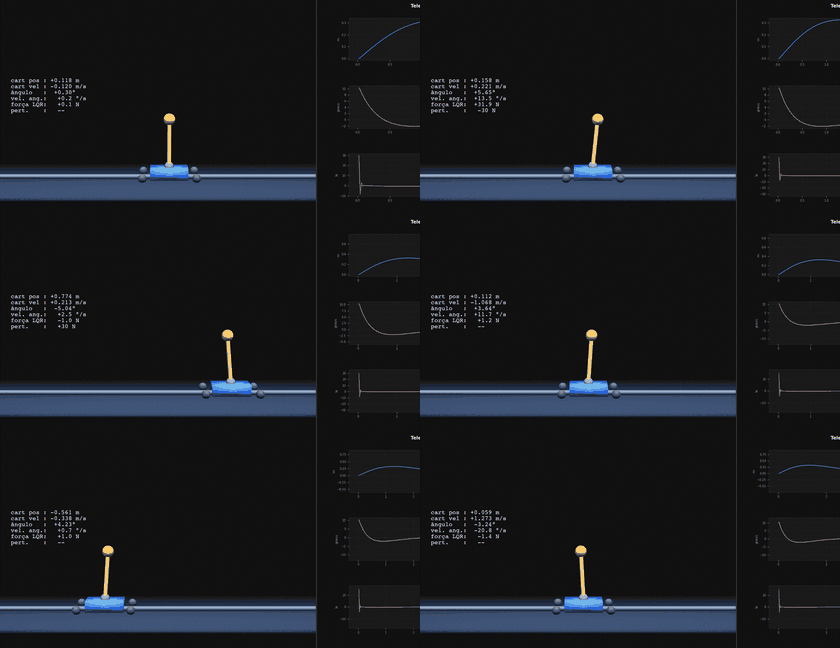
Full real-time window combining PyVista 3D animation and matplotlib telemetry panels.
from synapsys.viz import CartPoleView
CartPoleView().run()
A complete window with:
- 3D panel — real-time physics animation (PyVista + VTK)
- Telemetry panel — 4 synchronized matplotlib charts (position, angle, control, phase portrait)
- Control bar — hold-to-apply perturbation buttons, magnitude slider, pause/reset
- Automatic LQR — if no controller is provided, the lib linearizes the simulator and designs an LQR internally
- Global keyboard capture — A/D (perturbation), R (reset), Space (pause), Q (close)
Available 3D simulators
| Class | Physical system | State | Input | Perturbation |
|---|---|---|---|---|
CartPoleView | Cart + inverted pendulum | [x, ẋ, θ, θ̇] | Horizontal force on cart (N) | ◀/▶ horizontal force |
PendulumView | Single-link inverted pendulum | [θ, θ̇] | Joint torque (N·m) | ↺/↻ angular torque |
MassSpringDamperView | Mass-spring-damper | [q, q̇] | External force (N) | ◀/▶ force + setpoints 1/2/3 |
Architecture
SimulatorBase          ← synapsys.simulators
│  dynamics(), step(), linearize()
│
├── CartPoleSim  ──→  CartPole2DView     (matplotlib 2D, no Qt)
│
SimViewBase            ← synapsys.viz.simview._base  (QMainWindow)
│  • creates Qt window (3D + matplotlib splitter)
│  • QTimer loop → _on_tick()
│  • auto-LQR via linearize() + lqr()
│  • keyboard, perturbations, pause, reset
│  • _build_all() called in run()
│
├── CartPoleView        ← state: [x, ẋ, θ, θ̇]
├── PendulumView        ← state: [θ, θ̇]
└── MassSpringDamperView ← state: [q, q̇]  + setpoint tracking
Standalone vs. library module
| Approach | Lines of code | Requires Qt knowledge? |
|---|---|---|
Standalone file viz3d_cartpole_qt.py | ~470 lines | Yes — layout, QTimer, splitter, canvas |
CartPoleView().run() | 1 line | No |
CartPoleView(controller=my_net).run() | 1 line + your function | No |
CartPole2DView().simulate() | 1 line | No — pure matplotlib |
Dependencies
# Minimal — CartPole2DView only
pip install synapsys

# Full 3D support
pip install synapsys[viz]
# or individually:
pip install pyside6 pyvistaqt matplotlib numpy
Note:
pyvistaqtrequires a VTK installation compatible with Qt. In headless environments (servers without a display), useCartPole2DViewinstead.