Custom Signal Injection (MIL / Batch Simulation)
File: examples/advanced/01_custom_signals/01_custom_signals.py
What this example shows
How to feed any arbitrary waveform into an LTI model and observe the output — without real-time constraints. This is Model-in-the-Loop (MIL) simulation: everything runs in software, as fast as the CPU allows.
The example also visually demonstrates the principle of superposition: the response to a combined input equals the sum of individual responses.
Theory
MIL vs SIL vs HIL
| Mode | Plant | Controller | Real-time |
|---|---|---|---|
| MIL | Math model | Math model | No — runs at CPU speed |
| SIL | Math model (real-time) | Real software | Yes |
| HIL | Real hardware | Real software | Yes |
MIL is ideal for batch testing, parameter sweeps, and signal analysis.
Principle of Superposition
For any linear system :
This example combines:
- A 1.5 Hz sine wave — simulating periodic mechanical vibration
- A step of amplitude 2 at — simulating a sudden load change
System used
Well-damped (close to critically damped) — attenuates the sine and responds smoothly to the step.
Result
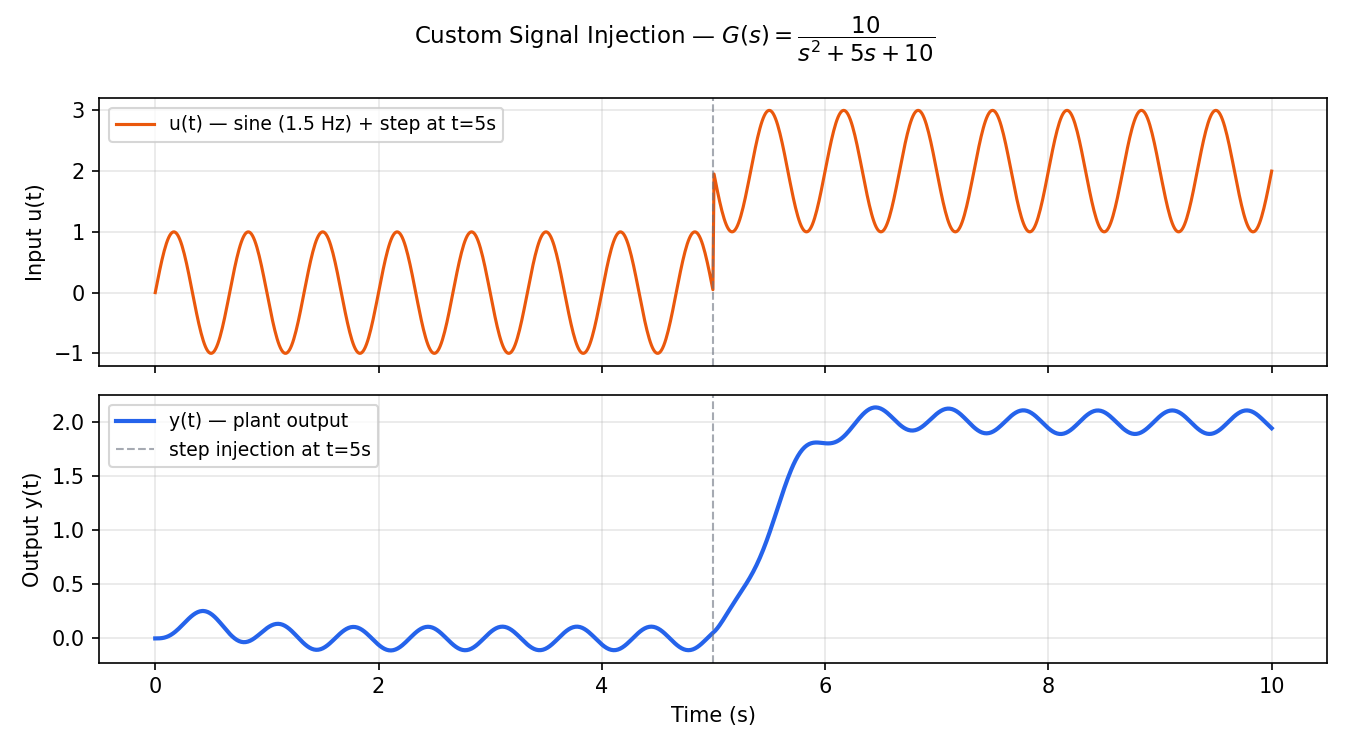
Top panel: the combined input = sine + step. The vertical line marks when the step is injected.
Bottom panel: the plant output . The DC level shifts upward after while the oscillation from the sine continues — superposition in action.
Code
import numpy as np
from synapsys.api import tf
import matplotlib.pyplot as plt

G = tf([10], [1, 5, 10])

t = np.linspace(0, 10, 1000)

# 1.5 Hz mechanical vibration
u_sine = np.sin(2 * np.pi * 1.5 * t)

# Step disturbance at t = 5 s
u_step = np.where(t >= 5, 2.0, 0.0)

# Superposition
u_total = u_sine + u_step

t_out, y_out = G.simulate(t, u_total)

plt.plot(t_out, u_total, label="Input u(t)")
plt.plot(t_out, y_out, label="Output y(t)", linewidth=2)
plt.legend()
plt.show()
Key API calls
| Call | What it does |
|---|---|
tf(num, den) | Builds the LTI transfer function |
G.simulate(t, u) | Computes output for arbitrary input array u over time t via scipy.signal.lsim |
np.where(cond, a, b) | Vectorised conditional — creates the step signal efficiently |
How to run
uv run python examples/advanced/01_custom_signals/01_custom_signals.py